Oride
English · Português
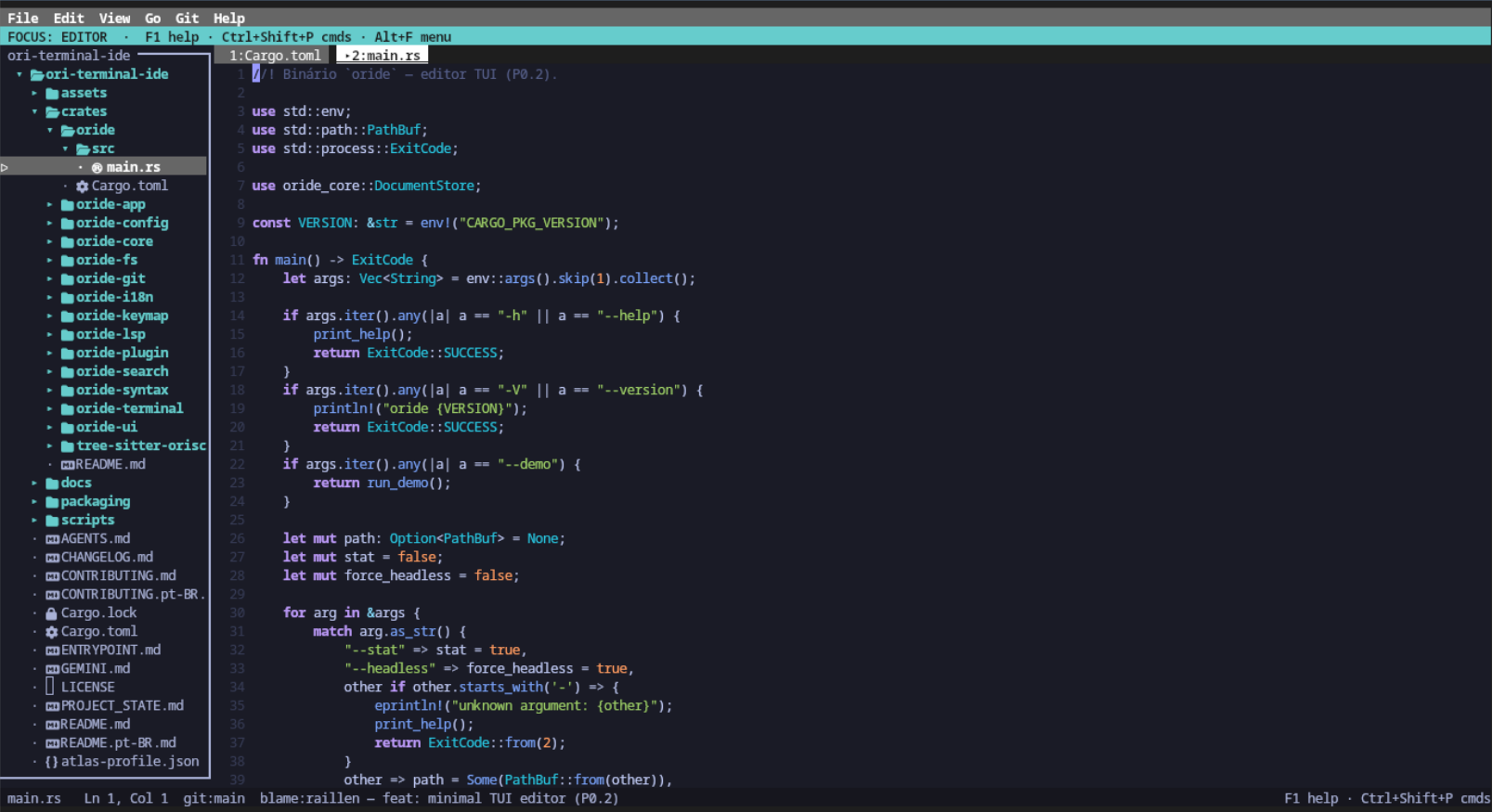
Oride (Ori + IDE) is a modular, lightweight, and extensible terminal code editor / mini-IDE built in Rust. It features a navigable project tree, collapsible embedded terminal, Vim-style modal editing, integrated declarative task runner (tasks.toml), environment health diagnostics (:health), and syntax highlighting for multiple languages (Rust, C, Bash, Markdown, Ori, HTML, CSS, JavaScript/TypeScript, Python, D, Lua, Nim, and Ruby).
Status: 0.2.0 — self-contained TUI mini-IDE (editor, project file tree, PTY terminal, Git/SCM with ahead/behind and pull/push, project search & replace with globs/regex, on-demand multi-LSP, rich Markdown preview with images and links, dynamic splits, opt-in mouse support).
Repository: ori-team/oride.
Documentation: User Guide · Architecture & Design · Configuration · Themes · Roadmap.
Goals (Lean & Contained Product)
- Everything in the TUI: Zero browser preview dependency, no slow scripting bloat, no heavy macro engines.
- Full-featured Layout: Multiple buffer tabs, project tree with Nerd Font glyphs, interactive PTY terminal, buffer & project-wide find and replace, Git/SCM status, lightweight workspace sessions.
- Supported Languages: Rust, C, Bash, Markdown, Ori, HTML, CSS, JS/TS, Python, D (dlang), Lua, Nim, and Ruby — auto-detection, syntax highlight, comment toggling, and Markdown fence injections (details).
- On-demand LSP: Local intelligent autocomplete + language servers spawned on-demand for Ori (
ori-lsp), Rust (rust-analyzer), C/C++ (clangd), Bash (bash-language-server), etc. (fully configurable inconfig.toml). - Rich Terminal Markdown Preview: Unicode box-drawing tables, fenced code blocks with syntax highlighting, and terminal graphics protocol rendering on supported terminals (Kitty/Ghostty/WezTerm).
- Preview Links: Open links in the system web browser via mouse click or
Alt+Enter. - Opt-in Mouse: Disabled by default (
mouse = false); when enabled, supports caret positioning, text selection by dragging, and split divider resizing.
Installation
Linux & macOS (One-Line Installer)
curl -fsSL https://raw.githubusercontent.com/ori-team/oride/main/scripts/install.sh | bash
Automatically detects platform (x86_64, aarch64), downloads the official binary, installs to ~/.local/bin/oride, and configures your shell PATH.
Windows (PowerShell)
irm https://raw.githubusercontent.com/ori-team/oride/main/scripts/install.ps1 | iex
Automatically installs oride.exe to $HOME\.oride\bin and permanently configures your Windows User PATH.
Distributions & Package Managers
- Debian / Ubuntu: Download
.debfrom Releases and install viasudo dpkg -i oride_*.deb. - Arch Linux: Install via
packaging/arch/PKGBUILD(makepkg -si) or pre-built.pkg.tar.zst. - Fedora / RHEL: Build RPM via
packaging/fedora/oride.spec. - Void Linux: Build package via
packaging/void/template. - Nix / NixOS: Run instantly via
nix run github:ori-team/orideor install vianix profile install github:ori-team/oride.
Building from Source
cargo build --release
./target/release/oride                  # CWD as workspace + empty buffer
./target/release/oride path/to/file     # Open specific file
./target/release/oride path/to/dir      # Open directory as workspace
./target/release/oride --version
Essential Keybindings (Rebindable via TOML)
| Key | Action |
|---|---|
| Typing / Enter / Backspace / Delete | Direct text editing |
| Arrow keys, Home, End, PgUp, PgDn | Cursor navigation |
Shift + Arrow keys / Home / End |
Extend selection |
Ctrl+Shift+Home / End |
Select to document start / end |
Ctrl+A |
Select all |
Ctrl+S |
Save active file |
Ctrl+Shift+S / F12 / Alt+Shift+S |
Save as… (integrated file browser) |
Ctrl+Alt+S |
Save all open buffers |
Ctrl+Z / Ctrl+Y |
Undo / Redo |
Ctrl+N / Ctrl+W |
New tab / Close tab |
Ctrl+PgUp / Ctrl+PgDn / Alt+← / Alt+→ |
Previous tab / Next tab |
Ctrl+B / Ctrl+E |
Focus project tree / Focus editor |
Ctrl+O |
Open folder as workspace (F2 confirms) |
Ctrl+P |
Open file |
Ctrl+" / Ctrl+' / `Ctrl+`` |
Toggle embedded PTY terminal |
Ctrl+Shift+G |
SCM / Git panel (s stage · u unstage · c commit · d diff) |
Ctrl+Shift+O |
Buffer picker (switch open tabs) |
Alt+F/E/V/G/I/H |
Menu bar (File, Edit, View, Go, Git, Help) |
Alt+/ |
Which-key (essential shortcuts reminder) |
F1 / Ctrl+G / Ctrl+Shift+/ |
List all keybindings with search filter |
F2 |
Git diff for active file |
| Type 2+ characters | Automatic local word autocomplete |
Ctrl+Space / Ctrl+K / F4 |
LSP autocomplete / hover info / goto definition |
Ctrl+Shift+I / Ctrl+Shift+M |
LSP format document / diagnostics panel |
Alt+= / Alt+- |
Increase / decrease terminal panel height |
Ctrl+R |
Reload file from disk |
Ctrl+Shift+F |
Find & Replace in Project (recursive fast search) |
Ctrl+Shift+V / Alt+P |
Real-time Markdown preview |
Ctrl+Alt+V / Ctrl+Alt+H |
Split editor vertically / horizontally |
F6 / Ctrl+Alt+W |
Cycle next split pane / Close pane |
Ctrl+Alt+↑/↓ / U |
Add multi-cursor / Clear multi-cursors |
Ctrl+F / F3 |
Find in buffer / Next occurrence |
Ctrl+H |
Replace in buffer |
Alt+C / Alt+A / Alt+W / Alt+R |
Toggle Case Sensitive / Ignore Accents / Whole Word / Regex |
Alt+Enter / Ctrl+Alt+Enter |
Replace current match / Replace all matches |
Ctrl+C / Ctrl+V / Ctrl+X |
Copy / Paste / Cut |
Alt+Z |
Toggle soft word wrap |
Ctrl+/ |
Toggle line comment |
Esc or Ctrl+Q |
Close overlay / Quit |
Navigation & Panels
- File Browser (
Ctrl+O/Ctrl+P): Cyan highlight indicates selection ·↑↓navigate ·Enteropens/enters · typing filters items. - Project Tree:
↑↓orjknavigate ·Enteropens file or expands folder ·rrename ·ddelete ·y/ccopy path ·Tab/Escreturns focus to editor. - PTY Terminal: Full interactive shell;
Ctrl+Csends interrupt to shell when terminal is focused;Escreturns to editor. - Vim Modal Mode: Type
:normalin command prompt to enable modal navigation (h,j,k,l,w,b,gg,G,x,u,:w,:q,:tasks,:health).
Configuration
mkdir -p ~/.config/oride
cp assets/config.example.toml ~/.config/oride/config.toml

# Local project configuration:
mkdir -p .oride && cp assets/config.example.toml .oride/config.toml
See docs/guides/en/config.md for full configuration options.
Workspace Layout
crates/
  oride-core/     # rope buffers, document tabs, undo history
  oride-config/   # TOML loading & layered merging
  oride-keymap/   # chord mapping & action dispatch
  oride-fs/       # project tree, file management, icons
  oride-git/      # git status porcelain integration
  oride-terminal/ # embedded PTY panel
  oride-syntax/   # Tree-Sitter highlighting & lexical engine
  tree-sitter-oriscript/  # vendored legacy grammar
  oride-ui/       # Ratatui widgets & rendering
  oride-app/      # application orchestration & event loop
  oride/          # CLI binary
docs/
  guides/         # user guides (guides/en/ & guides/pt/)
  en/             # canonical English documentation
  design.md       # architecture & design
Roadmap
Oride follows a strict lean, contained, and fail-closed philosophy with an uncompressed binary budget <= 12MB, startup time < 10ms, and input latency < 5ms.
Delivered Milestones
-
v0.1.0— Contained TUI Foundation: Rope buffers, file tree, interactive PTY terminal, buffer/project search, Git status badges, Markdown preview, on-demand multi-LSP client, splits, and multi-cursor. -
v0.2.0— First-Class Languages & Media: 13 supported languages, terminal graphics protocols (Kitty/Sixel/iTerm2), clickable links, Git sync & CLI staging (s/u/c/P/p), persistent session layouts, Vim modal mode, declarative task runner (tasks.toml), diagnostics (:health), dynamic i18n, and universal cross-platform packaging.
Upcoming Slices (Road to v1.0.0)
-
v0.3.0— Extensibility & Editing Ergonomics: Lua plugin engine (mlua), smart delimiter auto-pairing, modal text objects (ci",da(), PTY scrollback history, LSP symbol outline (Ctrl+Shift+O), and self-update CLI command (oride --update). -
v0.4.0— Extreme Performance & Large Files: Large file streaming mode (>100MB without UI freeze), zero-copy viewport rendering, lazy grammar initialization (<5ms boot), and interactive Git hunk staging. -
v0.5.0— Code Intelligence & Refactoring: LSP code actions / quickfixes (Alt+Enter), project-wide symbol renaming (F2), tabstop snippets, and direct diagnostics navigation. -
v0.6.0— Large-Scale Fuzzy Matching & Resilient Sessions: High-performance fuzzy matching engine (100k+ files), crash recovery swap sessions, and persistent jump list. -
v0.7.0— Visual Diffs & In-TUI Git Tooling: Side-by-side split visual diff viewer, subtle inline Git blame virtual text, and nested.gitignore/submodules. -
v0.8.0— Plugin Ecosystem & Secure Sandboxing: Dynamic language providers via Lua, declarative security sandbox (config.toml), and expanded lifecycle hooks. -
v0.9.0— TUI Accessibility & Unicode Hardening: High-contrast themes, CJK & emoji width alignment, binary file safety, and buffer fuzzing. -
v1.0.0— Production Stability (LTS): Lua API freeze, config schema freeze, automated latency (<5ms) and boot (<10ms) regression benchmarks.
For detailed technical specifications, architectural DAGs, and out-of-scope boundaries, check out the full Roadmap Specification or ROADMAP.md.
Contributing
Contributions are warmly welcomed! Please see CONTRIBUTING.md (Português) for guidelines, invariants, and pull request requirements.
License
MIT — see LICENSE.